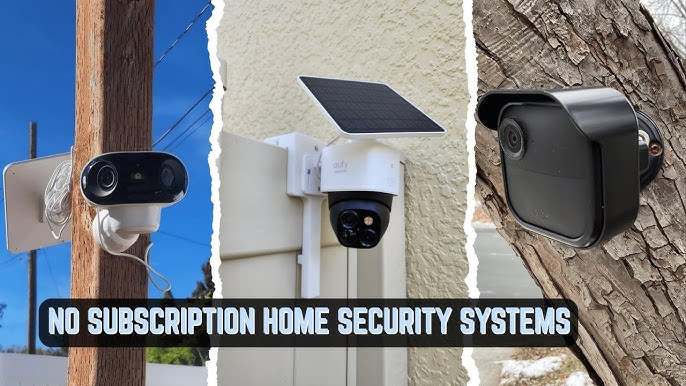
A homeowner in Arizona recently discovered that the security system included with their new house would cost nearly $2,100 in monitoring fees over five years—far more than the price of the equipment itself. That realization has led many homeowners to search for the Best Home Security System Without Subscription, hoping to protect their property without committing to years of recurring charges.
The good news is that effective home security no longer requires a monthly bill. Advances in smart cameras, local storage technology, and self-monitoring apps have made it possible to build a reliable security setup that continues working long after installation. However, not all systems are created equal.
Many security companies advertise affordable equipment while reserving important features such as video history, advanced alerts, or cloud storage for paying subscribers. Others offer full functionality with local recording, mobile access, and self-monitoring at no additional cost. Choosing the right option can save hundreds—or even thousands—of dollars over the life of your system.
If you’re looking for a subscription-free security solution, the goal isn’t simply to avoid monthly fees. It’s to find a system that delivers dependable protection, easy management, and long-term value without sacrificing essential features.
This guide explains how no-subscription security systems work, compares some of the best options available today, and helps you choose the right setup for your home, budget, and security needs.
Why Homeowners Are Looking for the Best Home Security System

The average professionally monitored security plan costs between $20 and $60 per month. At first glance, that may not sound expensive.
However, the numbers change dramatically over time:
| Monthly Fee | 3-Year Cost | 5-Year Cost |
| $20 | $720 | $1,200 |
| $35 | $1,260 | $2,100 |
| $50 | $1,800 | $3,000 |
For many households, these recurring costs eventually exceed the price of the hardware itself.
Several factors are driving interest in subscription-free systems:
- Rising household expenses
- Improved smartphone monitoring
- Better local storage technology
- Faster home internet connections
- Greater privacy concerns
A decade ago, professional monitoring was often necessary. Today, homeowners can receive instant notifications directly on their phones, view live camera feeds, and trigger alarms remotely.
That shift has made self-monitoring a practical alternative for many families.
How Subscription-Free Security Systems Make Money
Most companies still profit from hardware sales.
Instead of charging monthly fees, they earn revenue through:
- Camera sales
- Sensor upgrades
- Additional storage devices
- Smart home accessories
- Optional premium services
This business model allows buyers to own their equipment outright rather than continuously renting access to features.
The Hidden Cost of “Cheap” Security Systems
A common mistake is choosing the least expensive starter kit.
A $150 security package may seem attractive initially, but some brands require subscriptions for:
- Video history
- AI person detection
- Cloud recording
- Extended notifications
- Smart alerts
Without those subscriptions, certain cameras become far less useful.
Always check which features remain available after cancelling paid plans.
How the Best Home Security System Without Subscription Actually Works

The modern best home security system without subscription relies on local processing and self-monitoring rather than paid cloud services.
Instead of sending all footage to company servers, recordings are stored locally through:
- SD cards
- Internal memory
- Local hubs
- Network video recorders (NVRs)
- External hard drives
When motion is detected, the system sends an alert directly to your smartphone.
You decide whether action is needed.
Local Storage vs Cloud Storage
Understanding storage is critical before buying.
Local Storage
Advantages:
- No monthly fees
- Greater privacy
- Faster access to footage
- One-time cost
Disadvantages:
- Limited capacity
- Risk of physical theft
- Requires occasional maintenance
Typical storage capacities:
- 32GB SD card: 3–7 days
- 128GB SD card: 2–4 weeks
- 1TB drive: several months
Cloud Storage
Advantages:
- Off-site backup
- Easy remote access
- Automatic updates
Disadvantages:
- Monthly fees
- Privacy concerns
- Long-term cost accumulation
For most homeowners focused on savings, local storage provides better value.
Self-Monitoring vs Professional Monitoring
Professional monitoring centers can contact emergency services on your behalf.
Self-monitoring places that responsibility on the homeowner.
Professional monitoring makes sense for:
- Frequent travelers
- Vacation homes
- Elderly residents
- High-risk properties
Self-monitoring works well for:
- Most suburban homes
- Apartments
- Budget-conscious homeowners
- Tech-savvy users
For many buyers, self-monitoring remains the most cost-effective option.
Best Home Security System Without Subscription: Top Systems Compared

Not every system advertised as subscription-free offers the same experience.
Some are camera-focused. Others provide complete alarm protection.
Below are the strongest options currently available.
Ring Alarm (Self-Monitored)
Ring is often associated with subscriptions, but the alarm system can function without professional monitoring.
Typical starter cost:
- $200–$400
Features:
- Entry sensors
- Motion detectors
- Keypads
- Smartphone alerts
Pros:
- Beginner-friendly setup
- Large ecosystem
- Strong app support
Cons:
- Several advanced features encourage subscription upgrades
- Video storage often works best with paid plans
Best for:
Homeowners already invested in Amazon devices.
SimpliSafe Without Monitoring
SimpliSafe allows users to purchase equipment and operate it independently.
Typical starter cost:
- $250–$550
Features:
- Entry sensors
- Motion detection
- Indoor cameras
- Panic buttons
Pros:
- Simple installation
- Reliable hardware
- Flexible monitoring options
Cons:
- Reduced functionality without paid services
- Some automation features become limited
Best for:
Users wanting future flexibility to add professional monitoring.
Buying the Best Home Security System Without Subscription: Features That Matter Most

Many buyers focus on camera quality first.
In practice, several other factors matter just as much.
Motion Detection Accuracy
False alerts can quickly become frustrating.
Look for systems offering:
- Human detection
- Vehicle detection
- Package detection
- Pet filtering
Better detection means fewer unnecessary notifications.
Mobile App Quality
The app becomes your control center.
A good security app should provide:
- Fast alerts
- Live video feeds
- Easy footage playback
- Device management
- Remote arming and disarming
An excellent camera paired with a poor app often creates a disappointing experience.
Battery Life Expectations
Wireless devices vary considerably.
Typical battery estimates:
| Device Type | Average Battery Life |
| Door Sensor | 2–5 years |
| Motion Sensor | 1–3 years |
| Video Doorbell | 3–12 months |
| Wireless Camera | 3–12 months |
Manufacturers often quote ideal conditions. Real-world battery performance is usually lower.
Smart Home Compatibility and the Best Home Security System Without Subscription
Before purchasing equipment, check compatibility with existing smart-home devices.
Common integrations include:
- Amazon Alexa
- Google Home
- Apple HomeKit
- Smart locks
- Smart lighting
A connected ecosystem can improve both convenience and security.
For example, motion detection can automatically activate outdoor lights, making intruders more visible while helping homeowners verify alerts more quickly.
Best Home Security System Without Subscription Options for Advanced Users

The first group of systems covered earlier works well for mainstream homeowners. However, buyers who prioritize maximum control, larger storage capacity, or advanced camera coverage often prefer a different category of security systems.
These solutions typically require a little more setup but can deliver lower long-term costs and greater flexibility.
Reolink: The Best Home Security System Without Subscription for Camera Coverage
Reolink has built a strong reputation among homeowners who want extensive camera coverage without recurring fees.
Typical upfront cost:
- Single camera: $70–$150
- Four-camera NVR kit: $350–$800
- Eight-camera NVR kit: $700–$1,500
Key features:
- 2K, 4K, and 12MP camera options
- Network Video Recorder (NVR) support
- Local hard-drive storage
- Smart motion detection
- Person and vehicle recognition
- Mobile app access
Pros:
- Excellent video quality
- Large storage capacity
- Strong outdoor camera selection
- No mandatory subscription
Cons:
- Less polished smart-home integration
- Initial setup can be more technical
Best use case:
Homeowners who want multiple outdoor cameras and months of video storage.
A practical example is a detached home with four entrances, a driveway, and a backyard. In that scenario, a Reolink NVR system can record continuously for weeks without requiring any cloud storage plan.
Abode Security

Abode focuses on complete home protection rather than camera surveillance alone.
Typical upfront cost:
- $280–$700
Key features:
- Security hub
- Motion sensors
- Door and window sensors
- Smart-home automation
- Optional monitoring upgrades
Pros:
- Strong smart-home compatibility
- Supports self-monitoring
- Flexible expansion options
- Good automation tools
Cons:
- Some advanced features work better with paid plans
- Smaller camera lineup than competitors
Best use case:
Users who want security and smart-home automation in a single ecosystem.
Abode works particularly well for homeowners who already use connected locks, smart lighting, and automated routines.
Arlo Local Storage Models

Arlo is often associated with cloud subscriptions, but selected models support local storage through SmartHub devices.
Typical upfront cost:
- $250–$1,000+
Key features:
- High-resolution cameras
- Color night vision
- Local storage capability
- Smart notifications
- Wireless installation
Pros:
- Premium video quality
- Excellent image clarity
- Attractive hardware design
Cons:
- Higher equipment costs
- Many premium features encourage subscriptions
Best use case:
Buyers who prioritize video quality above all else.
For example, identifying vehicle license plates or facial details at longer distances becomes easier with Arlo’s higher-end camera lineup.
Buying Guide: Choosing the Best Home Security System Without Subscription for Your Situation

Different homes require different security strategies.
Choosing based on your lifestyle often produces better results than choosing based solely on specifications.
Apartment Owners
Recommended priorities:
- Wireless installation
- Compact sensors
- Video doorbell
- Easy relocation
Strong choices:
- Eufy
- Ring Alarm
Apartment dwellers typically need fewer devices, making starter kits sufficient.
Renters
Renters benefit from systems that avoid permanent modifications.
Look for:
- Adhesive-mounted sensors
- Battery-powered cameras
- Portable hubs
Strong choices:
- SimpliSafe
- Eufy
The ability to remove and reinstall equipment later is often more valuable than advanced automation.
Small Homes
For properties under 1,500 square feet:
Recommended devices:
- One doorbell camera
- Two to three entry sensors
- One motion detector
Strong choices:
- Ring Alarm
- Eufy
Spending heavily on enterprise-level equipment rarely provides additional value in smaller spaces.
Large Homes
Larger properties require broader coverage.
Recommended devices:
- Multiple outdoor cameras
- Several motion sensors
- Garage monitoring
- Expanded storage
Strong choices:
- Reolink
- Abode
Storage becomes increasingly important as camera counts increase.
Smart-Home Users
Homeowners already invested in automation should prioritize compatibility.
Look for integration with:
- Alexa
- Google Home
- HomeKit
- Smart locks
- Smart lights
Strong choices:
- Abode
- Ring Alarm
Automation can improve response times and convenience without requiring monthly fees.
Budget-Conscious Buyers
The lowest sticker price is not always the cheapest option.
Focus on:
- Total ownership cost
- Local storage availability
- Future expansion expenses
Strong choices:
- Eufy
- Reolink
The combination of local storage and no subscription requirements often produces the best long-term value.
FAQ
What is the best home security system without subscription for most homeowners?
For many households, Eufy offers the strongest balance of affordability, local storage, camera quality, and ease of use. However, Reolink may be a better choice for larger properties that require extensive camera coverage.
Can I monitor my home without paying monthly fees?
Yes. Many modern systems provide real-time smartphone alerts, live video access, and local storage without requiring recurring subscriptions.
Is local storage safer than cloud storage?
Each option has advantages.
Local storage provides greater privacy and eliminates recurring fees. Cloud storage offers off-site backups if equipment is damaged or stolen.
Many homeowners prefer local storage because it provides more control over recorded footage.
Do subscription-free systems call the police automatically?
Generally, no. Most subscription-free systems rely on self-monitoring. You receive alerts and decide whether emergency services should be contacted.
How much storage do I need for security cameras?
Requirements depend on:
- Number of cameras
- Video resolution
- Recording method
- Retention period
A single camera may function well with 128GB of storage, while larger systems often benefit from 1TB or more.
Are DIY security systems difficult to install?
Most modern systems are designed for beginners.
Wireless sensors typically attach with adhesive strips, while mobile apps guide users through setup.
Many homeowners complete installation within one to three hours.
Do subscription-free systems work with smart-home devices?
Many do.
Popular integrations include:
- Amazon Alexa
- Google Home
- Apple HomeKit
- Smart locks
- Smart lighting
Compatibility varies by manufacturer, so verify support before purchasing.
Are wireless security systems reliable?
Yes, provided they have:
- Strong Wi-Fi coverage
- Updated firmware
- Reliable power sources
- Proper placement
Most reliability issues stem from network problems rather than hardware defects.
What are the privacy benefits of local storage?
Local storage keeps footage inside your home rather than uploading recordings to third-party cloud servers.
Many privacy-conscious homeowners consider this one of the biggest advantages of subscription-free security systems.
Can I expand my system later?
Most major brands allow expansion.
You can usually add:
- Additional cameras
- Door sensors
- Motion detectors
- Video doorbells
- Smart-home accessories
Choosing a scalable platform prevents expensive replacements later.
Conclusion
Finding the right security setup is less about avoiding monthly fees and more about understanding how each system delivers value over time.
The best home security system without subscription for a small apartment may be completely different from the ideal choice for a large suburban property. Eufy stands out for balanced performance and ease of use. Reolink excels when extensive camera coverage and long-term storage matter most. Abode remains a strong option for smart-home enthusiasts, while Ring Alarm and SimpliSafe appeal to users who want flexible monitoring choices.
The biggest lesson is simple: evaluate total ownership cost rather than focusing solely on the purchase price. A system that costs more upfront can save hundreds—or even thousands—of dollars over the next five years.
Before making a decision, map your property, identify vulnerable entry points, estimate storage requirements, and compare long-term costs. Those steps will help you choose the best home security system without subscription that matches your budget, privacy preferences, and security goals without locking you into recurring monthly fees.





Leave a Reply