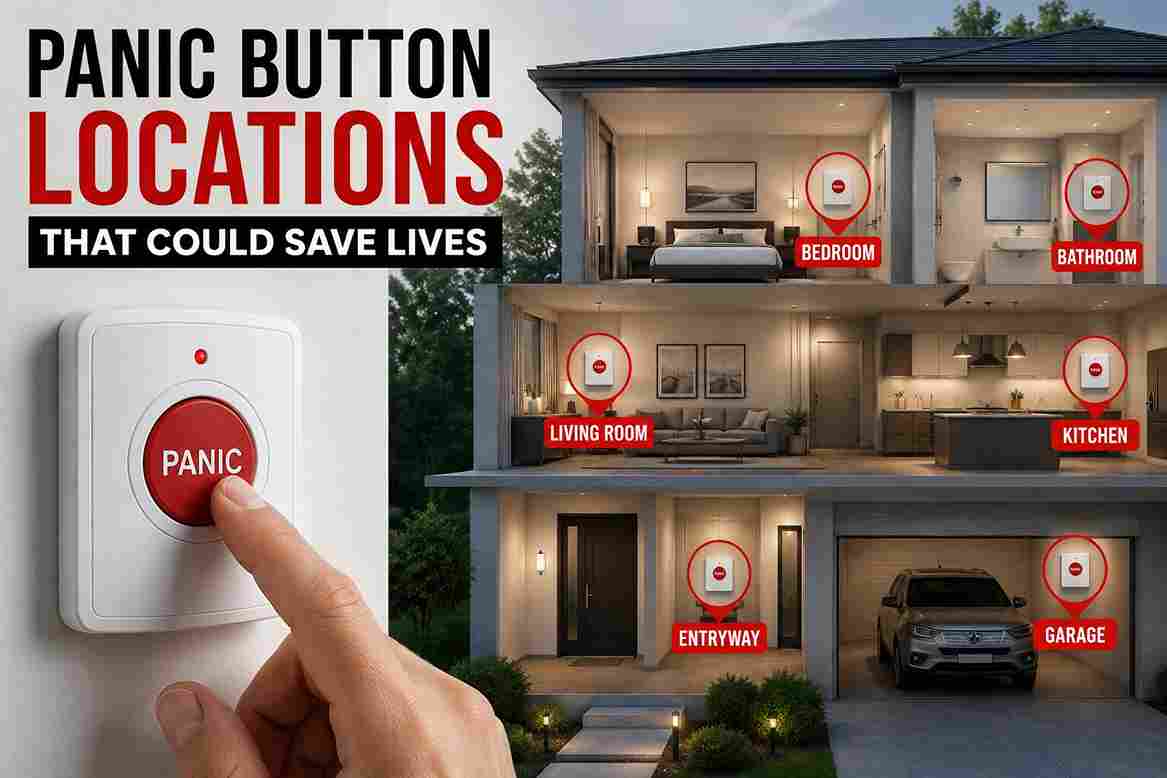
At 2:17 a.m., a homeowner wakes up to the sound of breaking glass near the back door. The smartphone is charging in the kitchen, and the security system keypad is mounted downstairs near the front entry. Walking through a dark hallway to reach either device would waste valuable seconds and potentially place the homeowner closer to danger. This is exactly the type of situation a panic button is designed to address.
With a single press, an emergency signal can be sent to a monitoring center, activate an alarm, or trigger other security responses. The goal is simple: reduce the time between recognizing a threat and requesting help. Many people assume panic buttons are only used in commercial buildings, banks, or retail stores. In reality, residential security systems increasingly support them, and they can provide an additional layer of protection for families, seniors, and individuals living alone.
This guide explains how panic buttons work, when homeowners should use them, where they should be installed, and how to choose the most effective placement for maximum protection.
What Is a Panic Button and How Does It Work?

A panic button is an emergency activation device that allows a homeowner to trigger a security response immediately without navigating a phone app, entering a keypad code, or making a call.
While designs vary, the purpose remains the same: provide fast access to help during emergencies.
Basic Function of a Panic Button
When activated, the button sends an emergency signal to a connected security system.
Depending on the setup, that signal may:
- Alert a professional monitoring center.
- Trigger an audible alarm.
- Send smartphone notifications.
- Activate security cameras.
- Notify emergency contacts.
Some systems offer silent activation modes. In these cases, the homeowner can request assistance without drawing attention to the fact that an alarm has been triggered.
Other systems activate sirens immediately, which may help scare off intruders or alert nearby neighbors.
Types of Panic Buttons Available Today
Homeowners can choose from several different styles.
Wall-Mounted Buttons
These are permanently installed in strategic locations such as bedrooms, offices, or near entry points.
Wireless Buttons
Battery-powered wireless models are common in modern security systems because they are easy to install and relocate.
Wearable Devices
Some systems offer pendants, wristbands, or keychain transmitters that function as portable emergency activators.
Mobile App Buttons
Many security apps include emergency activation features directly within the application.
Smart Home Integrations
Advanced systems can integrate emergency triggers into smart home ecosystems, allowing a button press to activate cameras, unlock doors for emergency responders, or turn on exterior lighting.
Why More Homeowners Are Installing a Panic Button

Several trends have increased homeowner interest in emergency activation devices.
Faster Emergency Response
During an emergency, every second matters.
Studies of emergency situations consistently show that people experience reduced decision-making ability under stress. Tasks that seem simple during normal conditions can become difficult during a crisis.
A dedicated emergency button removes unnecessary steps. Instead of searching for a phone, unlocking it, opening an app, and navigating menus, one press initiates the response.
Protection During Medical Emergencies
Not all emergencies involve crime.
Medical incidents are one of the most common reasons homeowners install emergency activation devices.
Examples include:
- Falls.
- Heart-related emergencies.
- Stroke symptoms.
- Severe allergic reactions.
- Mobility-related accidents.
For elderly residents, quick access to assistance can significantly improve outcomes.
Added Security During Home Intrusions
Home invasions remain relatively uncommon compared to property crimes, but they are among the most stressful situations homeowners can face.
A strategically placed panic button allows occupants to request assistance immediately without moving toward a security panel or attempting to call emergency services while under pressure.
This capability becomes especially valuable when family members are located in different areas of the home.
Peace of Mind for Families
Many homeowners install security equipment not because they expect an emergency, but because they want confidence that they can respond if one occurs.
Families with children often appreciate having an emergency activation option available.
Likewise, individuals living alone frequently report feeling more secure knowing help can be requested with minimal effort.
Large homes benefit as well because occupants may not always be near the primary security keypad.
When Should You Use a Panic Button?

Understanding appropriate use cases helps homeowners maximize effectiveness while reducing accidental activations.
Home Intrusion or Break-In
This is the scenario most people associate with emergency activation devices.
If an intruder enters the property or attempts forced entry, activating the system can:
- Alert monitoring personnel.
- Trigger emergency procedures.
- Activate sirens if configured.
- Record security footage.
However, homeowners should still prioritize personal safety. Activating an emergency signal does not replace having a family emergency plan.
Medical Emergencies
Medical incidents often occur unexpectedly.
Examples include:
- Sudden chest pain.
- Loss of consciousness.
- Serious falls.
- Difficulty breathing.
In monitored systems, emergency operators may contact designated responders immediately after activation.
For elderly homeowners, this may be one of the strongest arguments for installation.
Domestic Violence Situations
Some monitored security systems support silent emergency activation specifically designed for situations where drawing attention could increase danger.
A discreet activation device can provide an additional communication method during high-risk incidents.
Homeowners considering these applications should discuss available options with their monitoring provider.
Suspicious Activity Around the Property
Not every emergency involves confirmed criminal activity.
A homeowner may observe:
- Someone attempting to access vehicles.
- Unknown individuals lingering near entrances.
- Repeated attempts to access gates or sheds.
In certain situations, activating an emergency response may be justified, particularly if occupants feel threatened.
Fire or Smoke Emergencies
Modern smoke detectors provide automatic alerts, but homeowners sometimes encounter situations before sensors activate.
Examples include:
- Visible smoke.
- Electrical burning odors.
- Small fires spreading rapidly.
Emergency activation can supplement existing fire protection systems and speed up notification processes.
Best Places to Install a Panic Button in Your Home

Location has a major impact on effectiveness. A poorly placed device may be difficult to reach when it is needed most.
Master Bedroom
For many homeowners, the bedroom is the most important location.
Most residential break-ins occur when occupants are away. However, nighttime intrusions create unique challenges because people are often disoriented after waking up.
Pros
- Easy nighttime access.
- Protection during sleeping hours.
- Convenient placement near the bed.
Cons
- Limited usefulness when elsewhere in the home.
Recommended Height
Typically 36 to 48 inches from the floor, depending on furniture layout.
Common Mistake
Installing the device on the opposite side of the room rather than within arm’s reach of the bed.
Near Entry Doors
Entry points experience the majority of attempted unauthorized access events.
A nearby emergency device provides quick access if suspicious activity is observed while entering or leaving.
Pros
- Convenient during arrivals.
- Useful for monitoring exterior activity.
Cons
- May be visible to visitors.
Recommended Height
Approximately 42 to 48 inches above floor level.
Home Office
Remote work has made home offices more common.
Individuals who spend eight or more hours daily in a dedicated workspace should consider emergency coverage for that area.
Pros
- Accessible during work hours.
- Useful for people who work alone.
Cons
- May be overlooked during installation planning.
Living Room
Many families spend substantial time in shared living spaces.
Pros
- Central location.
- Accessible to multiple occupants.
Cons
- Potential visibility concerns.
- Greater chance of accidental activation.
Garage Entry Door
Many homeowners use the garage entrance more frequently than the front door.
This location provides protection during arrivals and departures while remaining relatively discreet.
Pros
- Convenient placement.
- Supports common household traffic patterns.
Cons
- Environmental conditions may affect some wireless devices if improperly installed.
Bathrooms for Elderly Residents
Bathrooms are one of the most common locations for household falls.
For older adults, accessibility in these spaces can be particularly valuable.
Pros
- Supports emergency medical response.
- Addresses a common accident location.
Cons
- Requires moisture-resistant equipment.
Children’s Rooms (When Appropriate)
Not every household needs emergency activation devices in children’s rooms.
However, some families choose installation when:
- Children are old enough to understand proper use.
- Medical concerns exist.
- Large homes create communication challenges.
Education and training are critical to prevent false activations.
Panic Button Placement Mistakes Homeowners Often Make

Even the best emergency device can become less effective if it is installed incorrectly. During residential security consultations, several placement mistakes appear repeatedly.
Installing It Too Close to the Main Alarm Panel
Many homeowners assume the emergency device belongs next to the primary security keypad.
While this may seem logical, it often provides little additional benefit. If someone can easily reach the alarm panel, they can usually activate the system directly.
A better approach is to place emergency activators in locations where a keypad is not immediately accessible, such as bedrooms, bathrooms, or detached workspaces.
Choosing Obvious Locations
Visibility is not always an advantage.
An intruder who notices an emergency activation device may attempt to disable it or monitor access to it.
Instead, consider locations that are easy for family members to reach but not immediately obvious to visitors.
Examples include:
- Inside bedside tables.
- Behind nightstands.
- Beneath desks.
- Near hidden shelving areas.
The goal is accessibility without unnecessary visibility.
Placing It Behind Furniture
Furniture layouts change over time.
A device mounted behind a dresser or large chair may become difficult to reach during an emergency. In stressful situations, even a few seconds of searching can feel much longer.
Always test access from multiple positions within the room before finalizing placement.
Forgetting About Accessibility
Emergency devices must remain usable by every intended occupant.
Common accessibility issues include:
- Mounting too high.
- Mounting too low.
- Installing behind obstacles.
- Ignoring mobility limitations.
For elderly residents or individuals with disabilities, placement should prioritize convenience over aesthetics.
Ignoring Family Training
Installation is only part of the process.
Family members should understand:
- When activation is appropriate.
- What happens after activation.
- How monitoring services respond.
- How to avoid accidental use.
A short family review every few months can significantly improve preparedness.
How a Panic Button Works With Modern Home Security Systems

Today’s home security platforms offer far more functionality than basic alarm activation.
Professional Monitoring Integration
Many monitored systems connect directly to emergency response centers.
After activation, operators typically:
- Receive the alert.
- Verify the emergency according to established procedures.
- Contact the homeowner if appropriate.
- Dispatch emergency services when required.
Response procedures vary by provider, but professional monitoring remains one of the most valuable features for many households.
Smart Home Automation
Modern systems can trigger multiple actions simultaneously.
Examples include:
- Turning on exterior floodlights.
- Locking smart door locks.
- Unlocking designated exits.
- Activating indoor lighting.
- Recording camera footage.
These automated responses provide additional situational awareness during emergencies.
Smartphone Notifications
Most systems now send immediate alerts to mobile devices.
Family members can receive:
- Activation notifications.
- Camera snapshots.
- Live video feeds.
- Monitoring center updates.
This feature is particularly useful when one household member is away from home.
Camera Recording Triggers
Security cameras can play a major role in emergency response.
Many systems automatically:
- Begin recording.
- Save video clips.
- Upload footage to cloud storage.
- Mark recordings as emergency events.
Platforms such as Ring, SimpliSafe, ADT, Vivint, and Alarm.com support various forms of emergency-triggered automation depending on system configuration.
Panic Button vs Smartphone Emergency Apps

Many homeowners wonder whether a smartphone emergency app provides the same benefits.
The answer depends on the situation.
| Feature | Panic Button | Smartphone App |
| Activation Speed | Immediate | Requires unlocking device |
| Reliability | Dedicated hardware | Depends on phone status |
| Accessibility | Fixed location or wearable | Must locate phone first |
| Battery Dependence | Usually long-term battery | Daily charging required |
| Ease of Use Under Stress | Very high | Moderate |
| Network Dependence | Often system-dependent | Usually requires connectivity |
| Family Access | Shared device possible | Individual device |
Which Option Is Better?
For most homeowners, the best approach is not choosing one or the other.
Instead:
- Use dedicated emergency activation hardware for immediate access.
- Use smartphone apps as secondary tools.
- Combine both with professional monitoring when possible.
This layered approach creates redundancy during emergencies.
Choosing the Right Panic Button for Your Home
Not every system fits every household.
Several factors deserve consideration before purchasing.
Wireless Models

Advantages:
- Easy installation.
- Flexible placement.
- No wall modifications.
Disadvantages:
- Battery maintenance required.
- Signal range considerations.
Wired Models

Advantages:
- Continuous power.
- No battery replacements.
Disadvantages:
- More complex installation.
- Less flexibility.
Most homeowners prefer wireless options because installation is simpler.
Battery Life Considerations
Battery life varies widely.
Some devices operate for several years on a single battery, while others require more frequent maintenance.
Look for systems that provide low-battery notifications before performance becomes affected.
Range and Connectivity
Large homes require special attention to wireless coverage.
Before installation, verify:
- Maximum transmission range.
- Compatibility with repeaters.
- Signal strength throughout the property.
Detached garages and workshops may require additional planning.
Monitoring Compatibility
Not all emergency devices work with every security platform.
Before purchasing, confirm compatibility with:
- Existing alarm systems.
- Monitoring providers.
- Smart home hubs.
- Mobile applications.
This prevents costly integration issues later.
Emergency Features to Look For
Useful features may include:
- Silent activation.
- Waterproof construction.
- Wearable options.
- Multiple activation methods.
- Smart home automation support.
- Emergency lighting triggers.
The best option depends on the home’s layout and the family’s needs.
Recommended Panic Button Setup for Most Homes

The ideal setup depends on home size and occupant needs.
Small Homes
Recommended setup:
- One bedroom device.
- One main living area device.
Checklist:
- Bedroom access
- Central living area coverage
- Family training completed
- Medium Homes
Homes With Elderly Residents
Recommended setup:
- Bedroom placement.
- Bathroom placement.
- Wearable emergency option.
Checklist:
- Accessibility reviewed
- Medical response procedures documented
- Batteries checked regularly
Homes With Children
Recommended setup:
- Shared-family emergency plan.
- Age-appropriate training.
- Limited access for very young children.
Checklist:
- Children understand proper use
- False activation procedures explained
- Emergency contacts updated
FAQ
Does a panic button automatically call police?
Not always. The response depends on system configuration and monitoring arrangements. Some systems notify a monitoring center first, while others may trigger local alarms only.
Can a panic button work without Wi-Fi?
Yes. Many security systems communicate through cellular backup connections or dedicated radio frequencies. Some devices do not rely on home Wi-Fi at all.
How many panic buttons should a home have?
Most homes benefit from at least one or two devices. Larger homes often require multiple locations to ensure fast access from different areas.
Can children use a panic button?
Yes, if they are old enough to understand proper usage. Parents should provide clear instructions and conduct occasional reviews.
Are panic buttons monitored 24/7?
Only if connected to a professionally monitored security service. Self-monitored systems generally notify homeowners rather than a monitoring center.
Where should a panic button not be installed?
Avoid locations that are difficult to reach, hidden behind furniture, exposed to damage, or likely to generate accidental activations.
What happens after pressing a panic button?
The system sends an emergency signal. Depending on configuration, this may trigger alarms, monitoring center notifications, smartphone alerts, lighting automation, and camera recording.
Can panic buttons trigger security cameras?
Yes. Many modern security platforms automatically activate camera recording and save emergency event footage when an emergency signal is received.
Conclusion
A well-planned emergency response strategy involves more than cameras, sensors, and alarm panels. Quick access to help can make a meaningful difference during home intrusions, medical emergencies, suspicious activity, or other urgent situations.
The most effective panic button installations focus on accessibility rather than convenience for installers. Bedrooms, living areas, garage entrances, and locations used by elderly residents often provide the greatest value. Equally important, family members should understand how the system works before an emergency occurs.
If your home already has a security system, review its emergency activation options and evaluate whether additional devices would improve coverage. The right placement today could save critical seconds when they matter most.





Leave a Reply